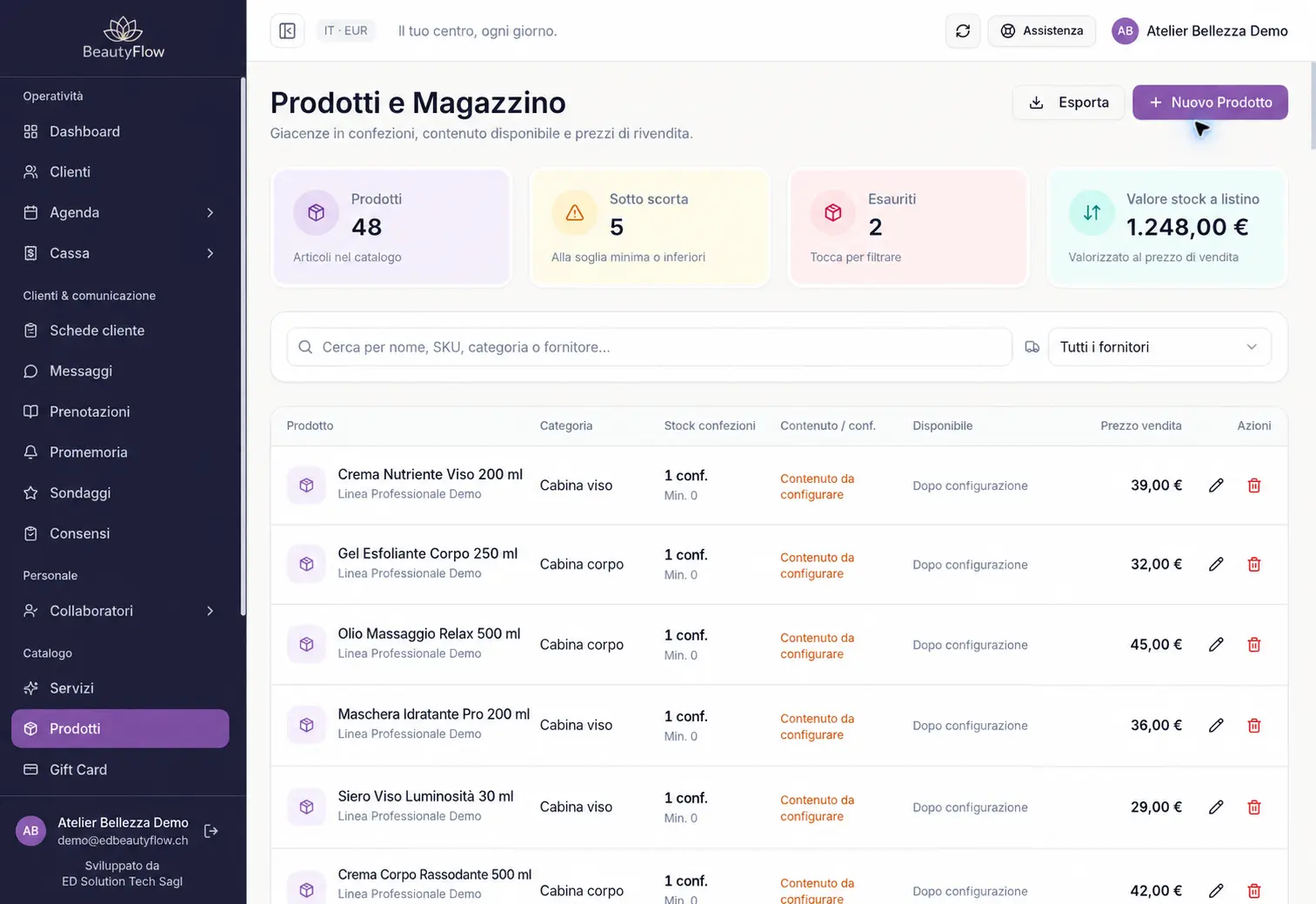
Organise your product catalogue
Keep product information, barcodes and recorded quantities in the catalogue. Give each salon product its own entry rather than rebuilding a list before every stock check. Price lists and currency follow the business account’s configuration.
Check stock levels against configured minimums
The product view highlights out-of-stock items, quantities at or below the configured minimum and items approaching that threshold. Colours and text labels help your team read the stock status. Use the information to plan quantity checks and decide which products need reordering.
Review the history behind a stock figure
Product movement history helps you follow changes in recorded quantities. Sales, stock receipts, stock issues and adjustments follow the management system’s supported workflows and user permissions. Archived products retain historical references and can be distinguished from the active catalogue.
Connect retail sales with inventory
When a product is sold through the management system’s checkout workflow, its inventory movement is linked to the recorded operation. A demo can show an example sale and the corresponding stock change. Payment and fiscal processes depend on your business configuration and enabled integrations.
Use the dedicated workflow for Hair product consumption
Salons using the Hair module can follow the supported colour formula consumption workflow, with the relevant quantities and units. This is separate from keeping a product catalogue: automatic consumption is not implied for every treatment. We can demonstrate the operations that fit your salon.